Getting Started
Installation
Download the latest build for your platform, then handle the one-time platform warning. KVault is currently unsigned, which is why you'll see a security prompt on first launch.
Download
Grab the latest installer from the Releases page on GitHub.
| Platform | File | Notes |
|---|---|---|
| macOS (Apple Silicon) | KVault_<version>_aarch64.dmg | M Series |
| macOS (Intel) | KVault_<version>_x64.dmg | Intel-based Macs |
| Windows | KVault_<version>_x64-setup.exe / .msi | Windows 10/11, 64-bit |
| Linux (x86_64) | KVault_<version>_amd64.AppImage / _amd64.deb | x86_64 |
| Linux (ARM64) | KVault_<version>_aarch64.AppImage / _arm64.deb | aarch64 |
macOS
Install
- Download the
.dmgmatching your CPU (Apple Silicon vs Intel). - Open the disk image and drag KVault into Applications.
- Eject the disk image.
First launch — Gatekeeper
KVault is not yet notarized by Apple, so macOS Gatekeeper will block the first launch with a message like "KVault can't be opened because Apple cannot check it for malicious software." This is expected — the binary is built and published from a public GitHub release, but Apple's notarization service requires a paid Developer ID certificate.
To open it the first time, use one of these two methods:
Option A — Right-click → Open
- Open Applications in Finder.
- Right-click (or Control-click) KVault and choose Open.
- Click Open in the confirmation dialog.
You only need to do this once. After that, KVault opens normally.
Option B — Remove the quarantine attribute
If the right-click menu doesn't show an Open option, run this in Terminal:
xattr -dr com.apple.quarantine /Applications/KVault.appThen open KVault from Launchpad or Spotlight as usual.
com.apple.quarantine extended attribute to anything
downloaded from a browser. Notarized apps bypass it; unnotarized
apps trigger Gatekeeper. Both options above tell Gatekeeper you
trust this specific app.
Windows
Install
- Download either
KVault_<version>_x64-setup.exe(NSIS installer) orKVault_<version>_x64.msi(MSI installer). Both work — choose.msiif your organization deploys via Group Policy. - Run the installer and follow the prompts.
First launch — SmartScreen
Windows SmartScreen will show "Windows protected your PC" because the binary is not signed with an Authenticode certificate.
- Click More info.
- Click Run anyway.
You only need to do this once.
Linux
AppImage (any distro)
chmod +x KVault_<version>_amd64.AppImage
./KVault_<version>_amd64.AppImage
Optional: integrate into your application menu using AppImageLauncher.
Debian / Ubuntu
sudo apt install ./KVault_<version>_amd64.deb
Then launch KVault from your application menu, or
run kvault from a terminal.
WebKit dependency
KVault is built on Tauri 2, which uses the system WebKit. It depends
on libwebkit2gtk-4.1-0 (GTK3). On Debian-based systems
you can install it explicitly:
sudo apt install libwebkit2gtk-4.1-0libwebkit2gtk-4.1-0 package was dropped from the
archive. KVault will not run on these versions until the upstream
Tauri GTK4 migration lands. Workarounds: use Ubuntu 24.04 LTS
(in a VM or container), or wait for a future KVault release built
against GTK4.
Supported distros
- Ubuntu 22.04 LTS, 24.04 LTS
- Debian 12+
- Fedora 39+ (install
webkit2gtk4.1) - Arch / Manjaro (install
webkit2gtk-4.1)
Verify the install
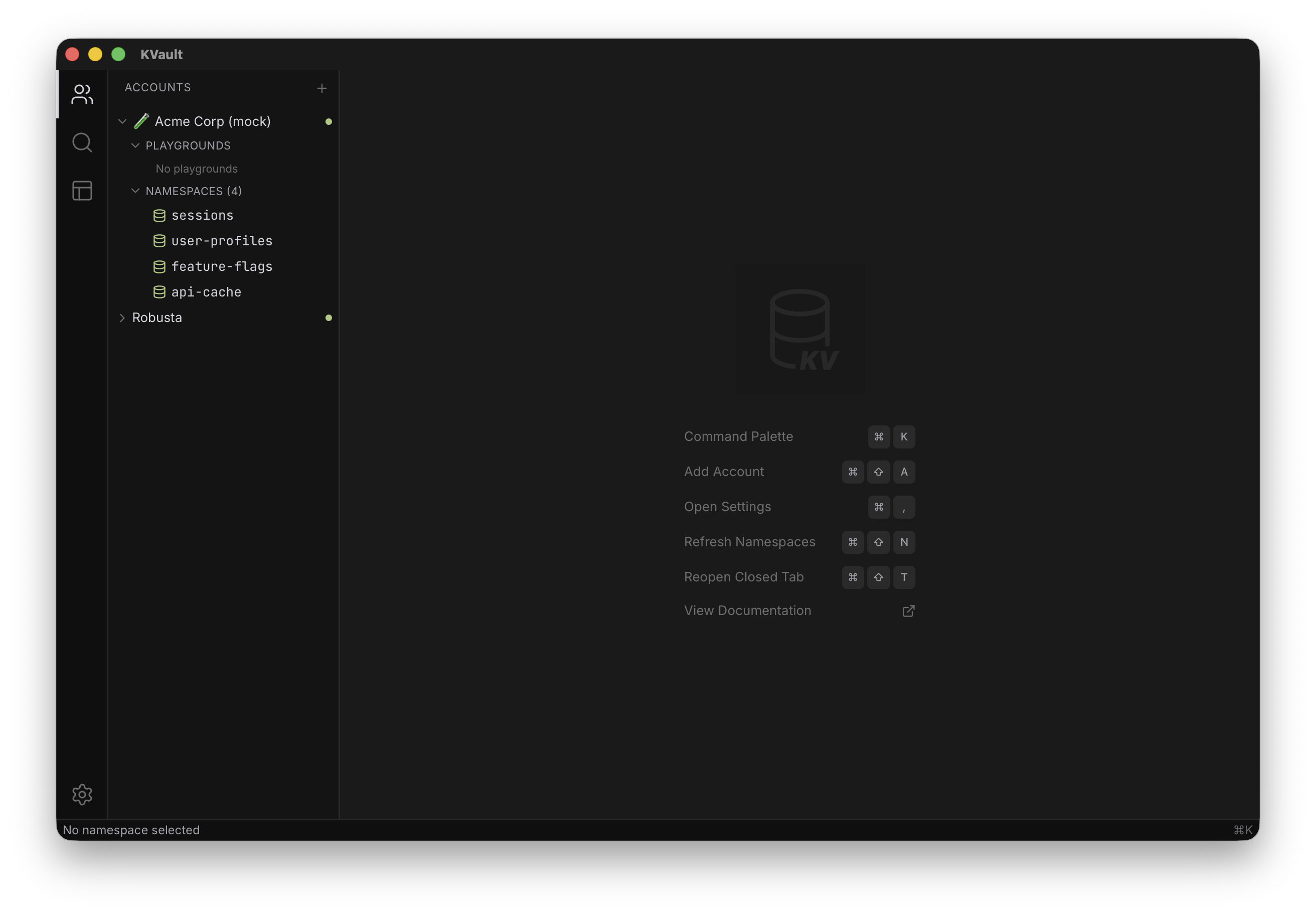
- Launch KVault. You should see the welcome screen with keyboard shortcuts.
- Open the command palette with Cmd+K (Ctrl+K on Windows/Linux).
- Continue to Getting Started to connect your first Cloudflare account.
Uninstall
- macOS: drag KVault from
/Applicationsto the Trash. - Windows: uninstall via Settings → Apps, or run the installer's
Uninstall KVaultshortcut. - Linux (deb):
sudo apt remove kvault - Linux (AppImage): delete the AppImage file.
Local data (cached key names, accounts metadata) lives in your OS app-data directory. API tokens are stored in the OS keychain and removed when you delete the corresponding account inside KVault — uninstalling the app does not delete them.