Features
Playground
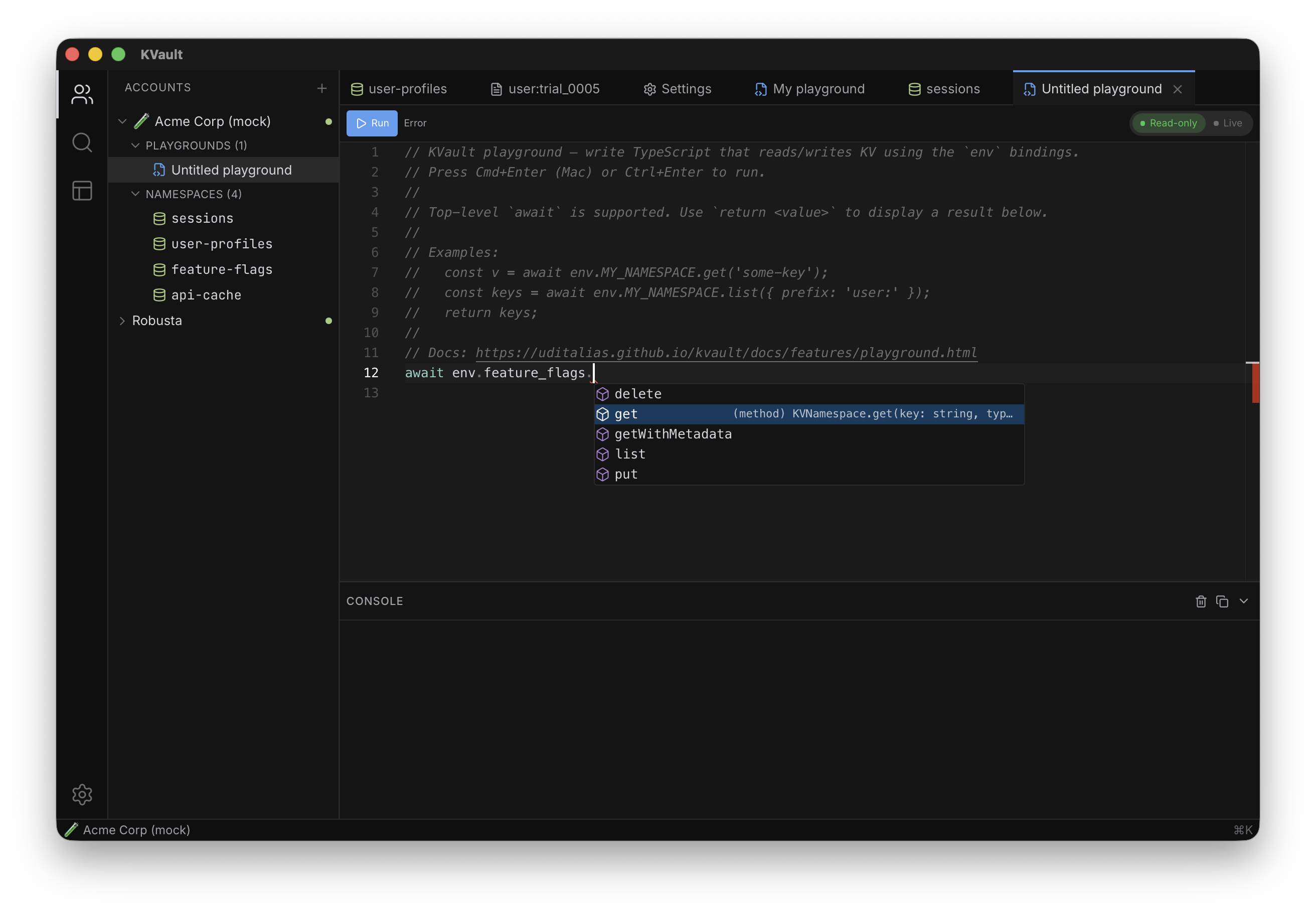
A TypeScript scratchpad for your KV data with full IntelliSense — autocomplete, hover docs, inline type-checking, and go-to-definition against your account's real namespaces. Write a short script and run it against Cloudflare in read-only or live mode.
What it is — and what it isn't
A playground is a data-access scratchpad. You get the Cloudflare
Workers env binding model, standard JavaScript built-ins,
and full TypeScript autocomplete for every namespace on the current
account. That's it.
It is not a general JS sandbox. There is no network
access beyond KV, no DOM, no file system, no fetch, no
setTimeout beyond 30 seconds, and no module imports.
Playgrounds are for reading, writing, listing, and transforming KV
data — if you need to do anything else, it belongs in a real Worker,
not here. See Limitations below.
Creating a playground
Right-click on an account in the sidebar tree and choose
New Playground…, or expand the Playgrounds section
under the account and click the + button in its
hover-revealed toolbar. A new tab opens with an empty TypeScript
editor on top and a console panel (powered by xterm.js) on the
bottom. Your code is autosaved ~500 ms after every keystroke — you
can close the tab at any time without losing work.
Playgrounds are scoped to the account they were created under. They live in KVault's local SQLite database, not on Cloudflare — nothing leaves your machine except the KV calls themselves.
Right-clicking a playground in the sidebar opens a menu with
Rename…, Export to file…, and
Delete. The upload icon next to the +
in the Playgrounds section header imports a .ts file
as a new playground — round-tripping scripts through git is a
supported workflow.
IntelliSense
The playground is a full TypeScript editor — same experience you get in VS Code, not a cut-down textbox:
- Autocomplete on your namespaces — type
env.and every namespace on the current account shows up, each typed as aKVNamespace. The list regenerates whenever namespaces are added, renamed, or removed, so autocomplete is always in sync with what Cloudflare actually has. - Autocomplete on the KV API —
.get,.put,.delete,.list,.getWithMetadatapop up with their real signatures. Hit Tab to fill parameters, hover any method for docs, jump to theKVNamespacetype definition to see the full surface. - Inline type checking — passing a number where a string is expected, or forgetting
await, gets a red squiggle as you type. Errors live in the same editor as the code, so you catch them before Run. - Hover docs and parameter hints — hover an identifier to see the real namespace title and id; hover a KV method to see its parameter types and description; type
(and the parameter hints stay visible as you fill them in. - Top-level
awaitandreturnare first-class — the editor doesn't flag either, and the runtime wraps your script so both work at file scope.
The env binding
Every namespace on the account is exposed as a property on a global
env object, using the Cloudflare Workers convention.
Namespace titles are normalized to valid JS identifiers:
- Non-alphanumeric characters replaced with
_(case is preserved — the title you see in the tree is the identifier you type). - A leading underscore is prepended if the title would otherwise start with a digit.
- Collisions (two titles normalizing to the same identifier) get a numeric suffix like
_2,_3.
So a namespace titled user sessions becomes
env.user_sessions, and a namespace titled
42-flags becomes env._42_flags. Hover an
identifier in the editor to see the real namespace title and id.
Because the Worker binding exposes the namespaces via env
as well as via the global scope, self.USER_SESSIONS
also works — pick whichever feels natural.
Read-only vs Live mode
New playgrounds start in Read-only mode — every
put() or delete() call throws, no request
reaches Cloudflare. This is the default because "I just wanted to
peek at some keys" should never be a foot-gun.
To enable writes, click the mode toggle in the tab header; the dot turns from green to red. The mode is saved per playground, so a migration script you intend as live stays live across app restarts. The toggle is disabled while a run is in progress — mid-run switches don't affect the active run either way, which avoids confusing half-applied scripts.
Running a script
Click Run in the tab header, or press
⌘/Ctrl + Enter. The script is transpiled in-browser by
esbuild-wasm (bundled locally with the app — no network
fetch), then run in a sandboxed iframe (sandbox="allow-scripts",
no same-origin) with the env bindings injected via a
message-passing RPC. The iframe cannot touch KV directly — every
get / put / delete / list
is forwarded to the Rust backend over postMessage,
which is also where the Read-only gate is enforced.
Console output streams into the xterm panel as it happens;
console.log, .info, .warn,
.error, and .debug are all wired and
colored by level. The final return value of the script is
pretty-printed at the end under a
—— return value —— divider.
To stop a run, click Stop or press ⌘/Ctrl + .. Stop cancels all future KV operations immediately. Requests whose HTTP call is already past the point-of-no-return may still complete at Cloudflare, so treat Stop as a best-effort kill switch, not an undo.
The console panel
The bottom panel is an xterm.js terminal wrapped in its own header bar. The header stays docked even when the console is collapsed so the affordance for reopening it is always visible.
- Clear (trash icon) — wipes the xterm buffer without touching the editor.
- Copy output (copy icon) — copies the entire terminal buffer to the clipboard and raises a toast; if the buffer is empty, the toast says so.
- Collapse / Show (chevron) — toggles the terminal area. Dragging the divider between editor and console also collapses; the chevron stays in sync either way.
The console auto-expands on Run even if it was collapsed, so you never lose output to a hidden panel. Clear and Copy remain clickable while collapsed — both act on the buffered terminal, not its visibility.
API reference
The playground implements the full Cloudflare Workers KV binding surface. Method signatures and semantics match the official Workers KV API exactly — code copied from a real Worker runs here unchanged.
env.NS.get(key, type?)
Reads a single key. type is one of
'text' (default), 'json',
'arrayBuffer', or 'stream'. Returns the
value, or null if the key doesn't exist.
env.NS.get(keys, type?)
Bulk read up to 100 keys in one call (Cloudflare's limit, enforced
server-side). Returns a Map<string, Value | null>.
Only 'text' and 'json' are allowed for
bulk reads.
env.NS.getWithMetadata(key | keys, type?)
Same as get, but returns
{ value, metadata } (or a Map of them for bulk calls).
Metadata is whatever was stored with the key on
put.
env.NS.put(key, value, options?)
Writes a value. value can be a string,
ArrayBuffer, ArrayBufferView, or
ReadableStream. Options:
expiration— absolute Unix timestamp (seconds since epoch).expirationTtl— relative seconds from now.metadata— any JSON-serializable value (Cloudflare caps the serialized form at 1 KiB).
Read-only mode rejects this call before any request is made.
env.NS.delete(key)
Removes a key. A successful call for a non-existent key is treated as success (matches Cloudflare's behavior — no error is raised). Read-only mode rejects this call before any request is made.
env.NS.list(options?)
Lists keys with prefix, limit, and cursor. Returns
{ keys, list_complete, cursor } matching the Workers
binding verbatim. Unlike the rest of KVault's UI, this call is
always live — it hits Cloudflare directly and returns real
cursors, so pagination behaves the same as in production.
Examples
Read a single value
const session = await env.USER_SESSIONS.get('session:abc-123', 'json');
console.log(session);
return session;
Scan a prefix and open one
const res = await env.USER_SESSIONS.list({ prefix: 'user:42:', limit: 50 });
console.log('matches:', res.keys.length);
return res.keys.map(k => k.name);
Bulk TTL bump (requires Live mode)
const { keys } = await env.SESSIONS.list({ prefix: 'short-lived:' });
for (const k of keys) {
  const value = await env.SESSIONS.get(k.name);
  if (value !== null) {
    await env.SESSIONS.put(k.name, value, { expirationTtl: 86400 });
  }
}
return `bumped ${keys.length} keys`;
Migrate with a transform (requires Live mode)
const { keys } = await env.PROFILES.list({ prefix: 'profile:' });
let moved = 0;
for (const k of keys) {
  const val = await env.PROFILES.get(k.name, 'json');
  if (val && typeof val === 'object' && 'email' in val) {
    await env.PROFILES_V2.put(k.name, JSON.stringify({ ...val, emailLower: val.email.toLowerCase() }));
    moved++;
  }
}
return moved;
Limitations
Playgrounds are deliberately narrow. Reaching for any of the following throws a clear error pointing back at this page:
- No network —
fetch,XMLHttpRequest,WebSocket, andEventSourceare shadowed and throw on access. The only way out of the sandbox is theenvbindings. - No DOM or storage —
document,navigator,localStorage,sessionStorage,indexedDB, andcachesare all shadowed. - No modules —
import()andrequire()are not available. Playgrounds are single-file. - Timers are capped —
setTimeout/setIntervalare allowed for short delays but any value above 30 s is clamped. Any residual timers are cleared when the run ends. - Mock account is unsupported — the dev-only mock account can't run playgrounds. Switch to a real Cloudflare account.
- Cancellation is best-effort for writes — clicking Stop cancels future operations, but requests already in flight at the Cloudflare edge may still commit. Treat Live mode as "these changes are probably going to happen the instant you ask for them".
- Cloudflare's limits apply — key size (512 bytes), value size (25 MiB), metadata size (1 KiB), bulk-read max (100 keys), TTL min (60 s), writes per key (1 /s). These are enforced at Cloudflare, not mirrored client-side, so their numbers are always current.
Tips
- Start in Read-only. Drop the script in, see it works, then flip to Live and run again. The extra second is worth it.
- Top-level
awaitworks. You don't need to wrap the script in an async function. - Top-level
returnalso works — the script is implicitly wrapped in an async function, soreturnat the top of the file ends the run and surfaces its value under the return-value divider in the console. - Use the return value as a lightweight summary:
return `updated ${n} keys`. - Switching tabs doesn't reset the playground — editor state and the console's scrollback survive tab switches so you can hop away and come back to the same output.
- Export to
.tsto share or version-control important scripts; re-import via the upload icon in the Playgrounds section header whenever.